升级 Spring Boot 3.x + SaToken 流程
代码兼容升级
1、feign 框架变更的兼容修改
feign.hystrix.FallbackFactory >> org.springframework.cloud.openfeign.FallbackFactory2、Java 标准变更的兼容修改
使用批量替换下面的变更:
javax.servlet  >> jakarta.servlet
javax.validation >> jakarta.validation
javax.annotation >> jakarta.annotation
3、Swagger 2 注解替换 为 OpenAPI 3 注解
对应关系为:
io.swagger.annotations.Api ->  io.swagger.v3.oas.annotations.tags.Tag;
o.swagger.annotations.ApiParam -> io.swagger.v3.oas.annotations.Parameter;
io.swagger.annotations.ApiOperation -> io.swagger.v3.oas.annotations.Operation;
io.swagger.annotations.ApiModel -> io.swagger.v3.oas.annotations.media.Schema
io.swagger.annotations.ApiModelProperty -> io.swagger.v3.oas.annotations.media.Schema
io.swagger.annotations.ApiImplicitParams -> io.swagger.v3.oas.annotations.Parameters
io.swagger.annotations.ApiImplicitParam -> io.swagger.v3.oas.annotations.Parameter
springfox.documentation.annotations.ApiIgnore -> com.github.xiaoymin.knife4j.annotations.Ignore
@Schema 示例:
@Schema(name = "AppAccountVO", description = "用户信息Vo对象")
@Data
public class AppAccountVO {

    @Schema(description = "绑定的三方用户名称")
    private String thirdUserName;

}@Operation、@Parameters、@Parameter、@SaCheckSign、@SaCheckApiKey 示例:
@Operation(summary = "获取应用的授权组织机构列表", description = "查询应用授权的组织机构列表(平台下放给应用的组织机构)")
    @Parameters({
        @Parameter(name = "lastSequence", description = "上一次去数据后台返回给客户的Seq,默认为0", required = false),
        @Parameter(name = "limit", description = "期望获取的数据量,0 < limit <= 1000,默认为1000", required = false)
    })
    @SaCheckSign
    @SaCheckApiKey(scope = {"App.Org.Info"})
    public ApiRestResponse<List<AppOrgVO>> getAppOrgList(@Valid @RequestParam(required = false, defaultValue = "0") Long lastSequence,
                                                           @RequestParam(required = false, defaultValue = "1000") Long limit) {
        try{
            Long appId = SaApiKeyKit.getAppIdAsLong();
            return ApiRestResponse.success(getAppOrgService().getAppOrgList(appId, lastSequence, limit));
        } catch(Exception e){
            logException(this, e);
            return ApiRestResponse.success(Collections.emptyList());
        }
    }
@Tag 示例:
@Tag(name = "机器人Feign接口")4、Mybatis-Plus 注解调整
把 @TableField(updateStrategy = FieldStrategy.IGNORED ) 改为 @TableField(updateStrategy = FieldStrategy.NEVER )
依赖及配置升级
1、升级 Maven 依赖
1.1、升级继承依赖
    <parent>
        <groupId>com.tianyin</groupId>
        <artifactId>tianyin-cloud-parent</artifactId>
        <version>2023.0.x.20251215-SNAPSHOT</version>
        <relativePath/>
    </parent>
1.2、升级组件依赖
1.2.1、Sa-Token 鉴权
        <!-- For Sa-Token 权限认证,在线文档:https://sa-token.cc -->
        <dependency>
            <groupId>cn.dev33</groupId>
            <artifactId>sa-token-spring-boot-starter</artifactId>
        </dependency>
        <!-- Sa-Token 整合 jwt -->
        <dependency>
            <groupId>cn.dev33</groupId>
            <artifactId>sa-token-jwt</artifactId>
        </dependency>
        <!-- Sa-Token 整合Redis (使用jackson序列化方式) -->
        <dependency>
            <groupId>cn.dev33</groupId>
            <artifactId>sa-token-redis-jackson</artifactId>
        </dependency>
        <!-- 提供Redis连接池 -->
        <dependency>
            <groupId>org.apache.commons</groupId>
            <artifactId>commons-pool2</artifactId>
        </dependency>
        <!-- Sa-Token插件:权限缓存与业务缓存分离 -->
        <dependency>
            <groupId>cn.dev33</groupId>
            <artifactId>sa-token-alone-redis</artifactId>
        </dependency>
1.2.2、Knife4j 接口文档
        <!-- For Knife4j -->
        <dependency>
            <groupId>com.github.xiaoymin</groupId>
            <artifactId>knife4j-openapi3-jakarta-spring-boot-starter</artifactId>
            <exclusions>
                <exclusion>
                    <groupId>org.springdoc</groupId>
                    <artifactId>springdoc-openapi-starter-webmvc-ui</artifactId>
                </exclusion>
            </exclusions>
        </dependency>
        <!-- For SpringDoc OpenAPI -->
        <dependency>
            <groupId>org.springdoc</groupId>
            <artifactId>springdoc-openapi-starter-webmvc-ui</artifactId>
            <version>${springdoc.version}</version>
        </dependency>
1.2.3、Dozer 对象转换
        <!-- For Dozer -->
        <dependency>
            <groupId>com.github.dozermapper</groupId>
            <artifactId>dozer-spring-boot-starter</artifactId>
        </dependency>
        <dependency>
            <groupId>com.github.hiwepy</groupId>
            <artifactId>dozer-extra-converters</artifactId>
        </dependency>
1.2.4、Mybatis-Plus
        <!-- For Mybatis-Plus -->
        <dependency>
            <groupId>com.baomidou</groupId>
            <artifactId>mybatis-plus-spring-boot3-starter</artifactId>
        </dependency>
        <dependency>
            <groupId>com.baomidou</groupId>
            <artifactId>mybatis-plus-jsqlparser</artifactId>
        </dependency>
        <!-- For Mybatis Plus Generator -->
        <dependency>
            <groupId>com.baomidou</groupId>
            <artifactId>mybatis-plus-generator</artifactId>
        </dependency>
        <dependency>
            <groupId>org.apache.velocity</groupId>
            <artifactId>velocity-engine-core</artifactId>
        </dependency>
1.2.5、Dynamic Datasource
Dynamic Datasource 迁移到 spring-boot3
        <!-- For Dynamic Datasource-->
        <dependency>
            <groupId>com.baomidou</groupId>
            <artifactId>dynamic-datasource-spring-boot3-starter</artifactId>
        </dependency>
2、升级程序版本
比如,业务中台,从 1.x.x 升级到了 3.0.0-SNAPSHOT
<version>3.0.0-SNAPSHOT</version>4、程序兼容改动
4.1、去除下面已经无效的配置
  #出现错误时, 直接抛出异常
  mvc:
    throw-exception-if-no-handler-found: true
    #不要为我们工程中的资源文件建立映射
  resources:
    add-mappings: false
  # 会话配置(交个Shiro管理,此处不再指定):
  session:
    store-type: none
  # 权限控制
  security:
    # 默认路径拦截规则定义
    filter-chain-definition-map:
      '[/]': anon
      '[/**/favicon.ico]': anon
      '[/webjars/**]': anon
      '[/assets/**]': anon
      '[/error*]': anon
      '[/logo/**]': anon
      '[/swagger-ui.html**]': anon
      '[/swagger-ui/**]': anon
      '[/swagger-resources/**]': anon
      '[/doc.html]': anon
      '[/bycdao-ui/**]': anon
      '[/v2/**]': anon
      '[/v2/api-docs]': anon
      '[/v3/api-docs/**]': anon
      '[/v3/api-docs]': anon
      '[/kaptcha*]': anon
      '[/actuator*]': anon
      '[/actuator/**]': anon
      '[/druid/*]': ipaddr[192.168.1.0/24]
    stateless: true
    app:
      authz:
        allow-session-creation: false
        continue-chain-before-successful-authentication: true
        path-pattern: /**
4.2、调整 application.yaml 默认配置
spring 配置发生了改变,去除了一些无效配置,特别注意,Redis 的配置发生了变化
spring 配置发生了改变,去除了一些无效配置,特别注意,Redis 的配置发生了变化
################################################################################################################
###Spring Boot 监控(安全、开放信息等)配置:
################################################################################################################
management:
  server:
    # 启用独立运维端口
    port: 50000
  metrics:
    tags:
      # 在统计信息中添加自定义的标签
      application: ${spring.application.name}
  # 开启shutdown和health端点
  endpoint:
    shutdown:
      enabled: true
    health:
      probes:
        enabled: true
  endpoints:
    web:
      # 指定上下文路径,启用相应端点
      base-path: /actuator
      exposure:
        # 指定上下文路径,启用相应端点
        include: health,shutdown,metrics,prometheus

############## SpringDoc 配置 (文档: https://springdoc.org/) ##############
springdoc:
  api-docs:
    enabled: true
    path: /v3/api-docs
  packages-to-scan:
    - com.tianyin.dw.standard.web.mvc
  swagger-ui:
    path: /swagger-ui.html
    tags-sorter: alpha
    operations-sorter: alpha
knife4j:
  enable: true

################################################################################################################
###Spring Boot 相关组件(SpringMVC、Freemarker、Session、Cache、DataSource)配置:
################################################################################################################
spring:
  # 应用信息配置
  application:
    name: tianyin-edu-third
  # 缓存配置:
  cache:
    type: none
  # 配置文件导入:
  config:
    import:
      - nacos:tianyin-common.yaml
      - optional:nacos:sa-token.yaml
      - optional:nacos:${spring.application.name}.yaml
      - optional:nacos:${spring.application.name}-${spring.profiles.active}.yaml
  # 数据源配置:
  datasource:
    name: ${spring.application.name}
    # HiKariCP的数据源配置:
    hikari:
      enabled: true
      allow-pool-suspension: true
      auto-commit: false
      # 连接初始化SQL
      connection-init-sql: select SYSDATE()
      # 连接测试语句
      connection-test-query: select SYSDATE()
      # 连接超时, 等待连接池分配连接的最大时长(毫秒),超过这个时长还没可用的连接则发生SQLException, 缺省:30秒
      connection-timeout: 30000
      initialization-fail-timeout: 30000
      #一个连接idle状态的最大时长(毫秒),超时则被释放(retired),缺省:10分钟
      idle-timeout: 600000
      # 内存泄漏侦测入口
      leak-detection-threshold: 30000
      # 一个连接的最大的生命时间(毫秒),超时而且没被使用则被释放(retired),缺省:30分钟,建议设置比数据库超时时长少30秒以上,参考MySQL wait_timeout参数(show variables like '%timeout%';)
      max-lifetime: 1800000
      # 连接池中允许的最大连接数。缺省值:10;推荐的公式:((core_count * 2) + effective_spindle_count)
      max-pool-size: 15
      # 最小闲置线程
      min-idle: 5
      # 生效超时
      validation-timeout: 30000
  data:
    # Redis相关配置
    redis:
      client-type: lettuce
      # 连接超时时间(毫秒)
      timeout: 50000
      # 基于Lettuce客户端的Redis连接池配置
      lettuce:
        pool:
          enabled: true
          # 连接池最大连接数(使用负值表示没有限制)
          max-active: 200
          # 连接池最大阻塞等待时间(使用负值表示没有限制)
          max-wait: -1
          # 连接池中的最大空闲连接
          max-idle: 10
          # 连接池中的最小空闲连接
          min-idle: 0
  # 国际化信息配置
  messages:
    #指定message的basename,多个以逗号分隔,如果不加包名的话,默认从classpath路径开始,默认: messages
    basename: i18n/*/messages,i18n/messages
    #设定Message bundles的编码,默认: UTF-8
    encoding: UTF-8
  # Servlet配置
  servlet:
    multipart:
      enabled: true #默认支持文件上传
      max-file-size: -1 #不做限制
      max-request-size: -1 #不做限制

############## Sa-Token 配置 (文档: https://sa-token.cc) ##############
sa-token:
  # token 名称(同时也是 cookie 名称)
  token-name: satoken
  # token 有效期(单位:秒) 默认30天,-1 代表永久有效
  timeout: 2592000
  # token 最低活跃频率(单位:秒),如果 token 超过此时间没有访问系统就会被冻结,默认-1 代表不限制,永不冻结
  active-timeout: -1
  # 是否允许同一账号多地同时登录 (为 true 时允许一起登录, 为 false 时新登录挤掉旧登录)
  is-concurrent: true
  # 在多人登录同一账号时,是否共用一个 token (为 true 时所有登录共用一个 token, 为 false 时每次登录新建一个 token)
  is-share: false
  # 是否在登录后将 Token 写入到响应头
  is-write-header: true
  # 溢出 maxLoginCount 的客户端,将以何种方式注销下线: LOGOUT=注销下线, KICKOUT=踢人下线, REPLACED=顶人下线
  overflow-logout-mode: replaced
  # 顶人下线的范围: CURR_DEVICE_TYPE=当前指定的设备类型端, ALL_DEVICE_TYPE=所有设备类型端
  replaced-range: curr_device_type
  # token 风格(默认可取值:uuid、simple-uuid、random-32、random-64、random-128、tik)
  token-style: random-128
  # 是否输出操作日志
  is-log: true
  # jwt秘钥
  jwt-secret-key: xx1WET12^%3^(WE45
4.2、修改程序启动器
- 去除 @EnableExtrasConfiguration 注解
- 去除 @EnableWebSecurity 注解
- 去除 @EnableMethodSecurity 注解
- 去除 @EnableGlobalMethodSecurity 注解
- 增加 @EnableDiscoveryClient 注解
- 增加 @Import(DozerAutoConfiguration.class) 解决 Dozer 框架不兼容 Spring Boot 3 问题
import com.github.dozermapper.springboot.autoconfigure.DozerAutoConfiguration;

@EnableCaching(proxyTargetClass = true)
@EnableDiscoveryClient
@EnableFeignClients(basePackages = "com.tianyin.edu.**.feign")
@SpringBootApplication
@Import(DozerAutoConfiguration.class)
镜像构建升级
1、升级 Dockerfile
Dockerfile 中的JDK 镜像改为 JDK 17
#FROM aiban-docker.pkg.coding.net/tianyin/base/openjdk:8-jdk-alpine
#FROM aiban-docker.pkg.coding.net/tianyin/base/openjdk:8-jdk-alpine-skywalking
FROM aiban-docker.pkg.coding.net/tianyin/base/openjdk:17-jdk-alpine
2、升级 Jenkinsfile
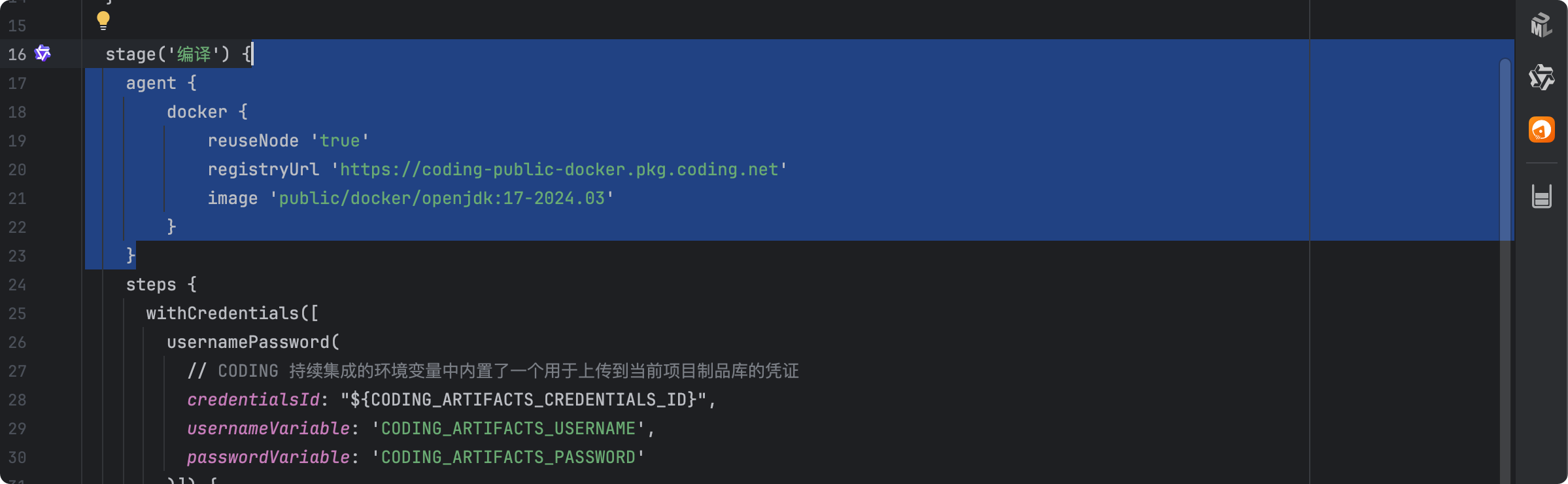
在 Jenkinsfile 文件的编译模块,增加 JDK 17 编译环境代理
    agent {
        docker {
            reuseNode 'true'
            registryUrl 'https://coding-public-docker.pkg.coding.net'
            image 'public/docker/openjdk:17-2024.03'
        }
    }
作者:杭州天音 创建时间:2025-12-25 09:55
最后编辑:杭州天音 更新时间:2026-01-15 23:20
最后编辑:杭州天音 更新时间:2026-01-15 23:20